We will be using Doodle, a free and simple online scheduling tool, to schedule live one-on-one portfolio presentations between you and your Department Head. Please follow along carefully to ensure you sign up for a presentation slot and have the opportunity to specify your preferred time. Presentations will take place in Week 15, and you must have your time scheduled by the end of Week 13.
Click here to access the Presentation Scheduler. This will open Doodle in a new browser window. You will see instructions, a table of time slots, and a list of students who have already signed up, if any.
Please note: initially, you might see only some of the available time slots, with the rest hidden intriguingly behind an accordion-like area, as shown in the example screenshot below.
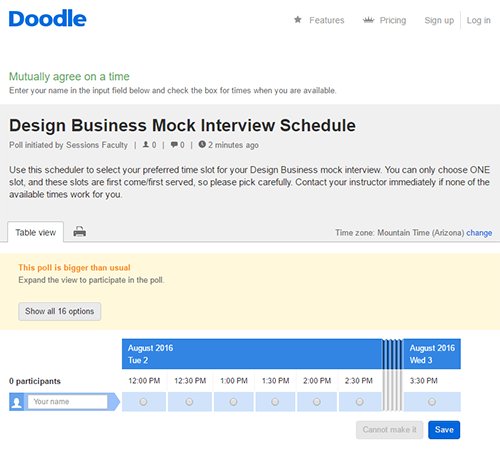
Don't panic: this is just a Doodle quirk. To see all of the available times, click the "Your name" field. This will unfold the accordion of available times. Now you are ready to sign up!
1. Enter your name in the "Your name" field. Make sure not to press Enter (PC)/Return (Mac) after entering your name! Your name will not be saved correctly if you do.

2. Click the button below your preferred time slot to select it.
Important: These times are set for Eastern Standard Time (EST), so please plan accordingly!
If a time slot is not available because someone else has already signed up, you will be unable to click the button, as shown below:

If a time slot is available, you will be able to select it, as shown below.

3. One more important last step! After you have selected your time slot, click the "Save" button on the far right side of the window. If there are many available time slots, you might have to scroll to your right to find the "Save" button. It's crucial to click "Save" after selecting your slot; if you don't, your selection will not go through.

After you have saved your selection, your instructor will receive an email notification of your preferred slot. Take heed: there is no way to edit your slot after you have selected it. If you need to change your time, email your instructor, who can change your slot for you.
If You Forgot Your Slot
If you forget which slot you signed up for, simply revisit the Doodle poll by clicking "Presentation Scheduler" in the Week 12 folder. Find your name on the list of participants, and look for the green check mark in the slot table.
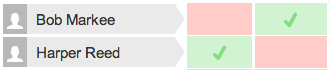
And that's it! You're all set. If you have trouble signing up or you find that you have a conflict with all of the time slots available, please contact your instructor immediately. Please be courteous of your instructor's available times. Once more: the time slots in Doodle are for Eastern Standard Time (EST), so please plan accordingly!
