Capstone Project | Digital Media | Department Head and Developer: Greg Marlow


Capstone Project: Digital Media

In your Digital Media program, you began to develop the technical and creative skills that are essential for professional digital media design. This capstone project tests your ability to meet the program standards in a single client project.

Your client needs a 2D animated mascot to promote their services and products on both their Web site and for a short commercial.

This is a three-stage project:

Stage One: You will present for initial feedback your research and concept for a mascot, including a 2D image of the mascot and a mockup of your client's home page featuring the mascot. You will also present a storyboard and concept for your commercial.

Stage Two: After you have your character concept and rough commercial storyboard, you will start building and compiling a package of assets for your commercial. At least one asset—but not the character itself—will be a 3D element built in Maya. You will present this package of assets along with a rough draft of the character animation in the commercial for the second round of feedback.

Stage Three: In the final stage, you will complete all shooting, animation, and compositing and present a final draft of your full commercial. You will use Adobe After Effects for your final editing. You are expected to present your final work professionally and write a presentation that details your thought process and design techniques.

Department head Greg Marlow will provide feedback at each of three stages of the project.

This document is broken up into the following sections. We recommend that you begin by thoroughly reading the entire document. Then as you work on each stage of the project, you can easily jump to a specific section using these links:

STAGE ONE

Choosing a Client

Choosing a Client
Downloads

Mascot Concept and Development

Researching the Mascot
Creating 2D Sketches
Creating a Full Color 2D Mascot Image
Designing a Home Page Mockup Wireframe
Producing a Commercial Storyboard
Submitting Your Concept and Development Deliverables

STAGE TWO

Asset Building and Rough Draft of Mascot Animation

Creating Animation Thumbnails
Setting Up Your Scene
Adding a 3D Asset
Blocking Out Your Animation
Creating a Rough Draft
Submitting Your Assets and Rough Draft

STAGE THREE

Creating Your Final Deliverables

Preparing the Full Commercial
Shooting and Editing
Compositing

Summarizing and Submitting Your Final Deliverables

Writing Your Final Presentation
Submitting Your Final Project

The project is designed to test your expertise in specific areas of proficiency you have been developing during your program. Your instructor will provide constructive feedback at each stage of the project. After your final presentation, your instructor will comment on the extent to which you have met each standard.


STAGE ONE
 

Choosing a Client

You have the option of choosing your own client for your capstone project or using our provided client Hostoftheweb Web Hosting, a Web hosting company in need of a mascot.

The project that you choose must be for a digital technology company with a Web presence and must result in the following deliverables:


  • 2D sketches of mascot character's key poses

  • One full color 2D mascot image

  • Wireframe mockup of client home page featuring mascot

  • Written concept and storyboard for 30 second commercial

  • Animation thumbnails

  • One 3D Maya asset for animation scene

  • Rough draft of 2D mascot animation in MP4 format

  • Final draft of full commercial in MP4 format

  • Final presentation


Creating Your Own Client

If you would like to choose your own client, you will need to decide on a number of important details before you begin your work. The digital technology company should have a distinctive name and a need for a Web presence. You should have a target audience in mind for the company as well as a sense of the voice or attitude of the client, which would affect the choice of the mascot. You should know/create enough details surrounding the client to create a realistic project. Your mascot should also be 2D, not 3D.

Remember that choosing your own client will require you to do your development of a logo and banner. This can be a time challenge and a design challenge, so choose wisely!

Write at least two paragraphs describing the client and the event to submit with your other Stage One items.

If you would prefer to work with our provided client, learn about their theater production below.

Provided Client: Hostoftheweb Web Hosting

Your client: Hostoftheweb Web Hosting

Your client Hostoftheweb Web Hosting is competing in a saturated market, and unfortunately they have an almost breathtakingly generic name. So they've hired you to create an ace in the hole that will help them stand out: a 2D animated mascot.

They want to use this mascot on both their Web site and for a short 30 second commercial. So from 2D to 3D and static to motion, this project will test all your digital media skills.

After careful review of portfolios and pitches, the client has decided that you're the designer to create a brand new mascot to boost their image. Any changes to the mascot the company makes in the future for this production will be tied together with your initial design.

Important: For maximum flexibility, the client is looking for a 2D mascot. But they are open to seeing the mascot interact with 3D assets in the commercial, as well as live action assets.

Hostoftheweb Downloads

The client has supplied a banner image and a logo. They would like to see a mascot that harmonizes with the color palette and typography of their logo, as well as the general creative direction of their existing design.
The banner for Hostoftheweb Web Hosting.

Fully layered Adobe Illustrator files for both the logo and banner are found in the downloads here. You will also find templates for your storyboards.

If you have chosen your own client, you will need to budget time for creating your own logo and banner, with successful color palette and typography choices.

Mascot Concept and Development
Researching Your Mascot

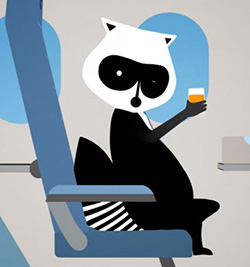
Boutique Canadian airline Porter Airlines uses an animated raccoon named Mr. Porter to great effect. Read more about Mr. Porter here.

In this project, the research and preparation of the concept for the client is almost as important as the actual production. You are expected to spend time researching other animated mascots in related genres, design and technology trends in those areas, and other work that may influence the direction of your concept.

With your submission for this stage of the project, provide the URLs of inspirational or competitive Web sites as references along with a written analysis and explanation of how they will contribute to your concept.

Creating 2D Sketches

After you have researched and developed a concept for your mascot, it's time to start making that mascot come to life. As with all animation projects, you will start with initial sketches. Create at least six black and white sketches of your mascot that feature key poses. Consider both your client needs, your mascot physiology and characteristics, and what will read excitingly in a short commercial.
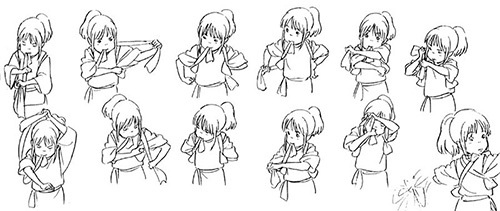
Sketches are an important part of the character development process. (Image credit: Studio Ghibli).

As you learned in your studies of time based media, capturing and sustaining the audience's attention is crucial, and you'll want to begin thinking about how your mascot can do that at this initial sketching stage.

Save your sketches as a single 72dpi JPG with the name mascot_sketches.

Creating a Full Color 2D Mascot Image

Now you will create a full color 2D image of your mascot. Choose the best and most communicative pose from your sketches, and produce a fully polished full color 2D image of your mascot using Adobe Photoshop and/or Adobe Illustrator. Consider how the color palette and design of your mascot will interact with the company's logo and typeface choices.

Save your image as a 72dpi JPG with the name mascot_image.

Designing a Home Page Mockup Wireframe

Now your client wants to see how this mascot will look with their site design, which—surprise!—they would also like you to wireframe. (Clients are so demanding!)

Using your research into similar digital technology companies as a guide (for example, hosting companies), create a wireframe defining the content areas of the home page. Remember that the purpose of the wireframe is not to present a design of a page, but to present the main elements of the page in a proposed layout.

Identify the global page elements that will stay fixed throughout the site, such as the logo and branding elements, top-level navigation bars, and copyright/footer info. Show how your mascot design will fully integrate into the home page as a global page element.
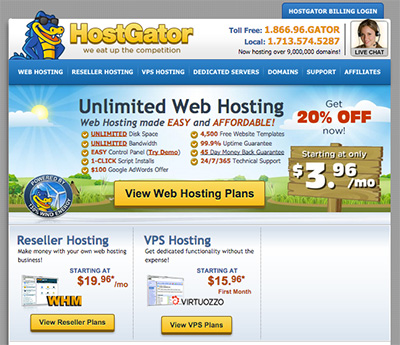
Study the Web sites of companies similar to your client for mascot integration inspiration. Here we see how Hostgator has integrated their mascot into their site.

If you are using the provided client, integrate the provided banner image as well. If you are using your own client, you will also need to design your own banner.

Save your wireframe as a PDF with the name mascot_wireframe.

Producing a Commercial Storyboard

Once you have a fully fleshed out sense of your mascot, you can begin envisioning a 30 second commercial for your client that features the mascot. You're expected to create individual storyboards

Before you begin your storyboards, type out the overall concept and story for the commercial. Save this conceptual planning as a PDF file named commercial_concept.

Now you will need to create a storyboard for your commercial, and you may use the template supplied by the client to help in your organization. Your research and client should influence the direction of your storyboards (and later your commercial) in terms of content, style, pacing, attitude, and approach. Allow your research to help you develop the narrative for your commercial.
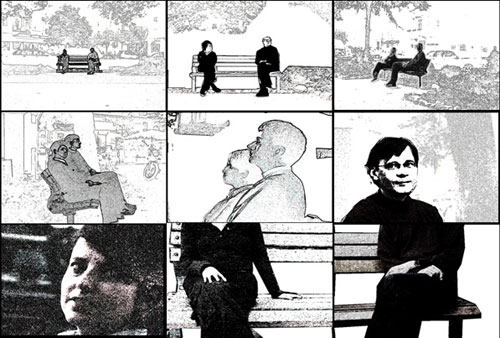
A storyboard is always very helpful to plan and visualize the progression. Shoots are not necessarily shot in successive order.

Your client will be looking for an exciting, dynamic commercial that features a variety of editing techniques. Research commercials of similar length that also use animated mascots. Consider ideas of linear and non-linear storytelling, editing, and film techniques.

Save your storyboards as a PDF file named commercial_storyboard.

Submitting Your Concept and Development Deliverables

Before you continue on to the development of the commercial, you are expected to present your concept research, sketches, full color mascot image, and commercial storyboard to your department head for feedback.

How to Post

In Dropbox 1 (Week 3), briefly explain how you feel your mascot will help communicate the message of the company and how you plan to implement the mascot concept in a 30 second commercial. Include your sketches, full color mascot image, and commercial storyboard. Additionally, please include your research URLs and your commentary on how they will contribute to your mascot concept.

If you have used your own client, also include at least two paragraphs that define the event.

We recommend waiting for feedback before you begin the next phase of the project in case any modifications are suggested by your instructor.


Back to top


STAGE TWO
 

Asset Building and Rough Draft of Mascot Animation
Creating Animation Thumbnails

With your storyboards created and the plan for your commercial set, it's time to start assembling all the pieces that will lead to the final product. But first, more planning! Proper planning is crucial for any multifaceted digital media project, and this commercial is no exception.

Because your commercial will feature your animated mascot in either a purely animated environment or a mix of live action and animation, you will need to do some thumbnailing to lock down the character animation.

Thumbnails are advanced sketches that lock down the plan for your mascot animation.

Review your initial sketches and any video reference thoroughly, focusing on key poses. In your thumbnails, remember to consider the 12 principles of animation, including squash and stretch, exaggeration, overlapping action, and staging. Focus on each drawing as a single pose. Make each thumbnail as clear as possible with clean silhouettes. You should be able to show each thumbnail drawing to a stranger, and they should be able to read it clearly. Thumbnail out every major pose of your mascot's animation in the commercial from beginning to end.

Save your thumbnails as a PDF and name the file mascot_thumbnails.

Setting Up Your Scenes

Even the best animated characters will feel lonely without interesting scenes for them to walk (or jump, or swerve, or punch, or...) around in. At this stage, you're ready to start setting up the scenes for your commercial.

Begin by reviewing your storyboard and seeing what you need for each scene. Now is the time to finalize important choices about whether to go for a fully animated environment, a live action environment with an animated character, or some mix of both. Consider your software workflow and proficiency as you make these decisions.

It is highly recommended you use Flash for your actual character animation, so if you elect to use a mix of live action and animation, consider how you will export assets and layers from Flash to non-linear editors such as Premiere Pro and After Effects.

For scenes featuring animated environments, build your scenes in an animation environment such as Flash. Use masks and overlays to prepare your scene for animation. For scenes featuring live footage, stake out your locations and shoot test footage.

And don't neglect audio! This is also the time to begin gathering any audio resources you might need for the commercial: background music, sound effects, or to begin recording and preparing any voiceover.

Compile all your scene assets in their appropriate formats (MP4s for test footage, FLA files for Flash environments) in a single ZIP file and name the file mascot_scenes.

Adding a 3D Asset

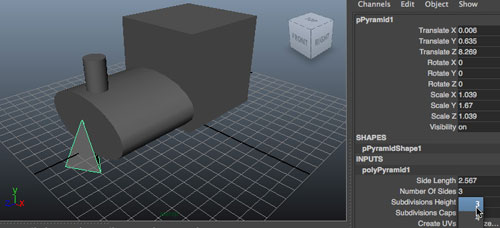
Working in Maya was an important part of your Digital Media program, which is good, because your client has specifically requested at least one 3D asset in their commercial!

Bear in mind, the mascot itself for this project will be 2D. But you will use Maya to create at least one simple animated 3D asset. Consider what makes sense for your commercial and mascot concept, and pick something in the scope of what you can accomplish. Intricate or epic animated backgrounds are very time consuming and difficult, as is photo realism. Go for cartoony or simplified and stylized models. Make sure your 3D asset is well lit and textured and has a simple but appropriate animation.

Build a 3D asset that makes sense with your mascot and commercial concept.

Render out your 3D asset in an appropriate format for integration into your animation or final commercial. Name the file mascot_3D.

Blocking Out Your Animation

Scene assets and thumbnails in hand, it's time to start blocking out your animation.

In the software you're using for the mascot animation, create your largest storytelling poses. Using your thumbnails as guides, create each keyframe of your animation. Remember the goal of keyframes: they should communicate as well as single images, as if you were going to print them out and hang them on the wall. Repeat this process for each frame.

Creating a Rough Draft

After you've blocked out your animation, it's time to crank things into motion! In your animation software (such as Flash), create a full rough draft of your mascot animation. Make sure every frame is accounted for, and implement rough versions of any motion effects. Consider details such as blinks and mouth movement.

Important: For this rough draft stage, you will not be creating the entire commercial. You are focusing on only the actual mascot animation. You may use the scene setup assets you've already built, but they do not have to be polished final versions, and you do not yet have to integrate any live action footage or audio. The goal for this stage is to create a full working rough draft of your character animation.

If you need to sketch proxy animatic quality versions of your final assets into the scene for reference, or to make the rough draft more clear, it may be helpful to do this as a previsualization step.

Export the completed rough draft of your mascot animation as an MP4 and name the file mascotanimation_roughdraft.

Submitting Your Assets and Rough Draft

Compile your thumbnails, scene assets, 3D asset, and mascot animation rough draft to present to your department head for feedback.

In the Dropbox, briefly explain how you feel your commercial concept will help communicate the message of the organization.

We recommend waiting for feedback before you build your final commercial in case any design modifications are suggested by your instructor.

How to Post

In Dropbox 2 (Week 5), briefly explain how you feel your concept and feedback evolved into your design elements. Include your thumbnails, scene assets, 3D asset, and mascot animation.

We recommend waiting for feedback before you build your final commercial in case any design modifications are suggested by your instructor.


Back to top


STAGE THREE
 

Creating Your Final Deliverables
Preparing the Commercial

Lights, camera, action! It's time to make the final commercial. Now is the time to finalize all your assets and prepare any live action shooting you will include in your commercial. Finalize any audio, including music and voiceovers. Set up your live action shots with careful consideration to composition and lighting and any editing you might need to do later. As with all video production shoots, take inventory of the following items: location, props, wardrobe, and sets.

This is also the time to begin setting up your final editing and compositing workspace in After Effects.

Your preparation will be part of your final presentation, so you do not need to present any individual files, but we recommend you keep notes on all scene setup.

Shooting and Editing

You will now shoot and edit any live action footage needed for the commercial. Consider scene framing, shot types, camera movements, pacing, transitions, and rhythm. Consider as well the constraints of your project: the 30 second time limit for the commercial, and how much time you have to shoot and edit and integrate your footage into the commercial.

When you are satisfied with your shots, import them into your After Effects workspace for final compositing.

Compositing

You're almost there! Load your animation, live action shots, rendered 3D asset, audio, and any other resources into your After Effects workspace for final compositing. Finalize any effects and title sequences. Don't get so wrapped up in the fun aspects of your commercial that you forget to advertise your client with a final logo or title frame!

Give yourself some time for several rounds of exporting and polishing to make sure your final commercial is as professional as possible.

Save your final 30 second commercial as an MP4 and name the file mascot_finalcommercial. Use compression techniques you've learned in your studies to keep the file size under 50MB.

Summarizing and Submitting Your Final Deliverables
Writing Your Final Presentation

You are expected to write a 1-2 page (approximately 500 words) professional presentation to accompany your visuals. This piece should clearly and completely describe your entire creative process, your technical process, and the choices you made. Your presentation should be directed at the client.

Use the following outline to help guide your written presentation:


1. Abstract

An overview of the project with an explanation of how your work solves the design challenge.

2. Approach to research and deliverables

A comprehensive description of your work at each phase of the project. Explain your creative choices, your techniques, and how each deliverable evolved from your research and initial concept. Be sure to cover each of the following:

  1. 2D sketches of mascot character's key poses

  2. One full color 2D mascot image

  3. Wireframe mockup of client home page featuring mascot

  4. Written concept and storyboard for 30 second commercial

  5. Animation thumbnails

  6. One 3D Maya asset for animation scene

  7. Rough draft of 2D mascot animation in MP4 format

  8. Final draft of full commercial in MP4 for

3. Feedback and critique

A description of the feedback you received at each stage and an account of how the feedback figured into subsequent work in the project.

4. Project achievements

A description of how each final deliverable will positively impact the client's current and future goals. Be sure to cover each of the following:

a. Mascot
b. Commercial


Be sure to reference your understanding of digital media best practices throughout your presentation and express your creative direction, techniques, and process.

Save your written presentation as a PDF file named written_presentation.

Submitting Your Final Project

To complete your capstone project, you are expected to provide your complete series of files and your professionally written presentation.

How to Post

Compile all of your files into a single ZIP file to upload to Dropbox 3 (Week 7). You should have a total of ten files: 2D sketches of mascot, full color 2D image of mascot, wireframe mockup of client home page featuring mascot, written commercial concept, commercial storyboard, animation thumbnails, Maya asset, rough draft of mascot animation video, final draft of commercial, and presentation.

Note that your initial design deliverables, like the sketches, may have changed after you received feedback—be sure to include the latest versions of all files.


Back to top